About Me

Feeds RSS Contact Me

Twitter Updates

SubscribeLatest posts

SubscribeRecent Comments

Advertisements

Increase Your Backlinks
Showing posts with label Image Design Tools. Show all posts
Sunday, June 14, 2009

Portable AAA Logo 2008 free

0 comments


With AAA Logo you can create almost any type of website graphics or business graphics for high resolution printing. Logos, banners, buttons, headers and icons for your website with rich colors, gradients, shadows and reflections. Business graphics such as business cards, letterheads, posters and other business stationery can be designed and printed directly from AAA Logo or created images can be exported for use with other applications

Design logos / business graphics in any industry

The choice of objects and templates in this logo maker caters to a variety of businesses in most any industry, such as Technology, Finances, Healthcare, General Business and Retail, Education and Training, Travel and Tourism, Organizations, Sports and Fitness, Food and Beverage. Each object is carefully researched and concepted for a particular business type

Create professional, high resolution images in clicks

Now, anyone, regardless of creative ability, can blend shapes and text into an impressive logo in a few clicks. Just choose a logo layout you like from the collection of pre-build templates, edit the elements of the logo, add your business name and slogan. And finally, apply some styling. That’s it. Now, you can export the logo project for printing or for the Web. In addition to pre-build logo templates, you can make logos by yourself from scratch

Get started without having to open a manual

Sit down and bang out a high quality professional-looking logo after a few minutes of learning. The program is intuitive enough to figure out what it does without the need to read a 1000-page user manual. Just start choosing logo templates, pushing buttons and toggling sliders. After half an hour you may find yourself with a logo that makes you look like a logo design star!

File Size: 17.5Mb

Demo Site:
Logo Design Software - AAA Logo. Create your own logo right now! Free trial download

Download:
http://www.ziddu.com/download/4961098/AAALogo2008.rar.html

Wednesday, January 28, 2009

Image Reflection Generator

0 comments

ReflectionMaker.com is a little tool for all your reflection needs! You can generate an reflected image in 30 seconds. Three simple steps to do that

  1. Select an image to be reflected.
  2. Select the reflection size and image background colour.
  3. Click on the "Generate" button and view it's wonderful effect.
This is a sample of image that I've used to try the ReflectionMaker.

Before


After


It is easy as A,B,C.
So, try it on! Visit ReflectionMaker.com

Wednesday, January 21, 2009

GIMP 2- GNU Image Manipulation Program

0 comments


GIMP is a versatile graphics manipulation package. This page should help you get a taste of what GIMP is capable of. You can also have a look at GIMP's introduction page or browse through the tutorials.

Customizable Interface

Each task requires a different environment and GIMP allows you to customize the view and behavior the way you like it. Starting from the widget theme, allowing you to change colors, widget spacings and icon sizes to custom tool sets in the toolbox. The interface is modulized into so called docks, allowing you to stack them into tabs or keep them open in their own window. Pressing the tab key will toggle them hidden.


GIMP features a great fullscreen mode allowing you to not only preview your artwork but also do editing work while using the most of your screen estate.


Photo Enhancement


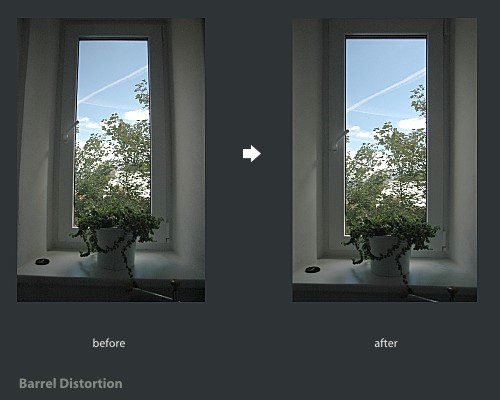
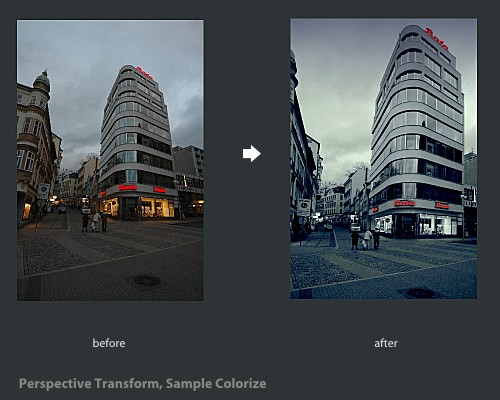
Numerous digital photo imperfections can be easily compensated for using GIMP. Fix perspective distortion caused by lens tilt simply choosing the corrective mode in the transform tools. Eliminate lens' barrel distortion and vignetting with a powerful filter but a simple interface.


The included channel mixer gives you the flexibility and power to get your B/W photography stand out the way you need.


Digital Retouching


GIMP is ideal for advanced photo retouching techniques. Get rid of unneeded details using the clone tool, or touch up minor details easily with the new healing tool. With the perspective clone tool, it's not difficult to clone objects with perspective in mind just as easily as with the orthogonal clone.


Hardware Support


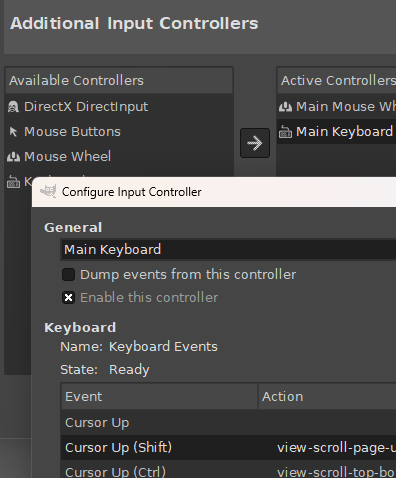
GIMP includes a very unique support for various input devices out of the box. Pressure and tilt sensitive tablets, but also a wide range of USB or MIDI controllers. You can bind often-used actions to device events such as rotating a USB wheel or moving a MIDI controller's slider. Change the size, angle or opacity of a brush while you paint, bind your favorite scripts to buttons. Speed up your workflow!


File Formats

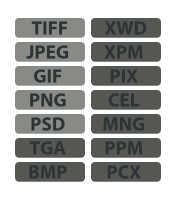
The file format support ranges from the common likes of JPEG (JFIF), GIF, PNG, TIFF to special use formats such as the multi-resolution and multi-color-depth Windows icon files. The architecture allows to extend GIMP's format capabilities with a plug-in. You can find some rare format support in the GIMP plugin registry.

Thanks to the transparent virtual file system, it is possible to load and save files to from remote locations using protocols such as FTP, HTTP or even SMB (MS Windows shares) and SFTP/SSH.


To save disk space, any format can be saved with an archive extension such as ZIP, GZ or BZ2 and GIMP will transparently compress the file without you needing to do any extra steps.


Supported Platforms


  • GNU/Linux (i386, PPC)

  • Microsoft Windows (XP, Vista)

  • Mac OS X

  • Sun OpenSolaris

  • FreeBSD